The Pink Tower: ten pink wooden cubes, stacked largest first.
17 Sep Sam built the Pink Tower on his own today. No help.

The Montessori school app for parent reports This is not a toy.

It is how a Montessori child learns to judge size. His teacher saw it happen and wrote it down. His parents never saw the notebook. Montigo makes that learning visible to parents.

Get a free demo

20 minutes on WhatsApp · with the founder · no follow-up spam

Running live at Kriya Global Montessori. Every parent is on the app, 75 of 75.

26 August · with a guide

“Is he learning, or playing with toys all day?”

Every Montessori parent asks it, sooner or later. There are no marks to show them, and no ranks.

That morning Sam placed three cubes, then looked up for his teacher. Anjali saw it. After the work cycle, she wrote it in her notebook.

The notebook never left the classroom.

3 September · some help

One line from the teacher. Montigo fills the record.

After the work cycle, away from the children, Anjali writes what she saw, the way she would say it. Montigo fills in the child, the material, the time, the help and the focus.

She checks it and saves. A field Montigo is not sure of stays empty. No phone on the classroom floor. No form at the end of a long day.

In pilot at Kriya Global Montessori
The teacher's phone
Add observation Save
Your observation3 Sept
SRChildSam R.
MaterialPink Tower
Time10 to 20 minAdded
HelpSomeAdded
FocusFocusedSet by you
Ready to saveTap any detail to change it.

Sam worked with the Pink Tower for 15 minutes. He needed some help.

10 September · mostly alone

That evening, his parents see the journey.

Not a mark. Not a rank. One block for each day Sam worked with the tower. A taller block means he needed less help. Nothing else is measured.

No score to compare at the school gate. One child, getting there at his own pace.

The new parent view. It opens to families after the teacher pilot.
The parent's phone
Sam's journeyOrchids class, with Anjali

Sam now builds the Pink Tower on his own.

  1. With a guide26 AugNext
  2. Some help3 SepNext
  3. Mostly alone10 SepNext
  4. On his own17 SepNext
Time
20+ min
Help
None
Focus
Deep

What the Pink Tower teaches

The eye learns to judge size before numbers ever appear.

From Anjali, his teacher

“Sam returned to the tower on his own and carefully compared each block before putting it away.”

17 September · on his own

Sam now builds the Pink Tower on his own.

Ten cubes, largest first, no help. Under it, in plain words, what the work is for. And a note in his teacher's own words.

The eye learns to judge size before numbers ever appear.

Time
20+ min
Help
None
Focus
Deep
From Anjali, his teacher“Sam returned to the tower on his own and carefully compared each block before putting it away.”

Nobody had to convince this parent. The record did.

17 September · the director

And you see every class, every day.

Which children were observed today. Which class is behind. Which reports are waiting for a second look. You do not ask a teacher. You open one screen.

Sam's tower is one of 27 on it today.

In pilot at Kriya Global Montessori
The director's phone
School observationsWillow Montessori
Today, 17 Sep45%

27 of 60children observed

1 of 4classes complete
25reports to review
OrchidsAnjali Sharma 11 of 269 to review
SunflowersLatha Menon 16 of 1616 to review
DaisiesDivya Nair 0 of 10Not started
LiliesRhea Thomas 0 of 8Not started

Sam, Anjali and Willow Montessori are sample names. No real child appears on this page.

The materials

Montigo already knows your shelf.

It covers most Montessori materials for ages 0 to 6. More than 200 of them, each with what it teaches, in plain words. Something on your shelf that is not here? Your teachers add it.

  • 200+materials, ready to pick
  • Ages 0 to 6
  • Add your ownfor anything we missed

Sensorial from about 3 years

The Brown Stair: ten brown wooden prisms laid side by side, from thick to thin.

Brown Stair

Ten prisms. All the same length, each one thinner than the last.

What the parent reads

The hand learns thick and thin. The same comparison mathematics will ask for later.

Sensorial from about 3 years

The Red Rods: ten red wooden rods, the shortest 10 centimetres and the longest a metre.

Red Rods

Ten rods. The shortest is 10 cm. The longest is a full metre.

What the parent reads

The whole body learns long and short, by carrying each rod across the room.

Sensorial from about 3 years

Colour Tablets: nine flat tablets in red, blue and yellow, each colour in three shades from dark to light.

Colour Tablets

It starts with three colours. It ends with sixty-three tablets: nine colours, each in seven shades, laid from darkest to lightest.

What the parent reads

The eye learns to tell one shade from the next. Small differences start to matter.

Sensorial from about 4 years

The Binomial Cube: eight red, blue and black wooden blocks that close into one cube.

Binomial Cube

Eight blocks that close into one cube.

What the parent reads

A puzzle for a four-year-old. Years later, the same cube explains algebra.

And more than 200 others. If your shelf has something we do not, your teachers add it.

Everything else a school runs on

Observation is the core. The rest of the school runs on the same app.

Attendance, transport, announcements, the calendar, special classes and parent concerns. Each person sees only their part.

7:42 AM → 8:14 AM9.6 km · 32 min · 18 km/h avg

Transport live tracking

See the van. Every minute of every trip.

Follow it live on the map. Parents get one nudge when the van is five minutes away, and walk to the gate.

Live in the app

Transport trip replay

Replay any trip. Slow roads and long stops show up.

The route is coloured by speed. Green where the van moved well, red where it lost time. Every long stop is marked with its minutes, so the talk with that family is about one gate, on one morning.

Also in transport

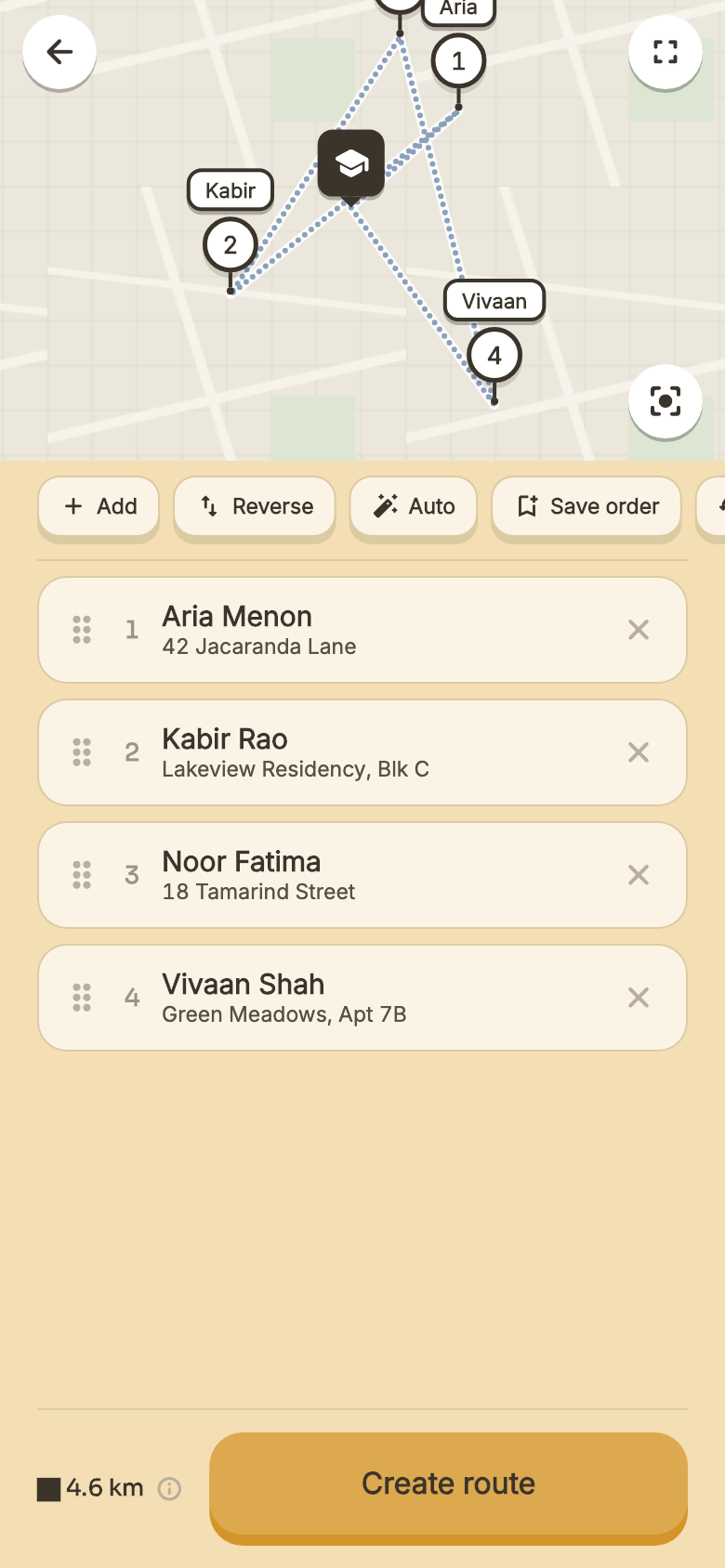
1 Route planning in the Montigo School app: every child's stop on a map, in pickup order.
Plan the route
Drop every child's stop. Drag the order, or tap Auto for the faster one.
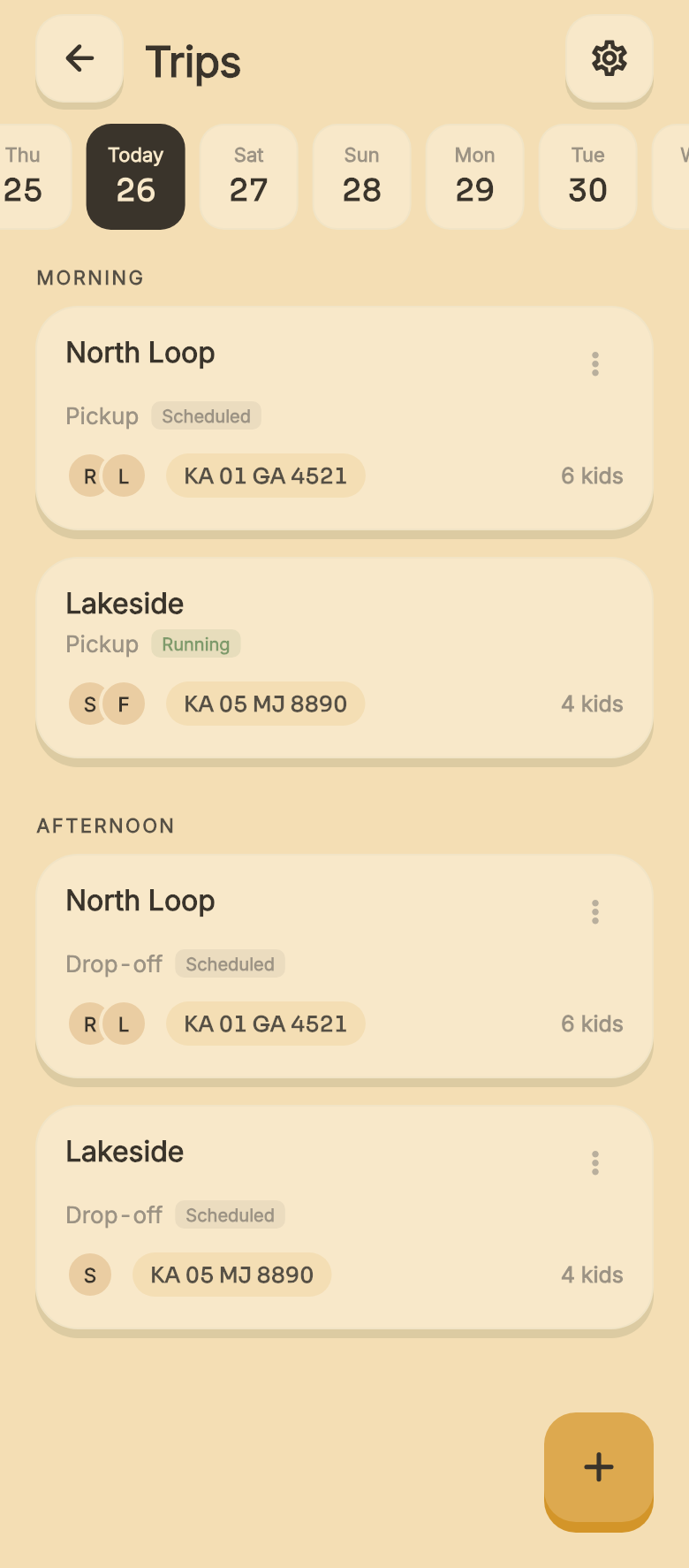
2 The day's trips in the Montigo School app: morning pickups and afternoon drop-offs for each van.
Schedule the day
Morning pickups and afternoon drops, per van. Pick up at one place, drop at another.
3
LIVE
Look inside
A camera in the van, live on your phone, with GPS. For the office, when you want it.
Orchids · Today
22/26 in
AK
Aanya K.
Not in yet
RM
Rehan M.
Late · 9:12
IS
Ishaan S.
On leave
Parent app
AK
Aanya is on her way
You will see it the moment she is in
…

Attendance check-in and check-out

A card taps at the gate. The register fills itself.

RFID check-in in the morning, check-out at pickup. The parent sees “she is in” the moment it happens.

  • Or mark the whole class in one pass, in the app.
  • Present, late, absent, on leave. Four clear states.
  • The day's numbers reach the director on their own.

Parent concerns without a system

Ten concerns. One desk. The first one gets buried.

A parent raises it at the gate at 3:15. Nine more land on the front office after it. By evening, nobody has read the first one.

Parent concerns routed, then closed

Each concern goes to the one person who owns it.

The parent picks who it is for. The class teacher, transport, fees, or the art teacher for an art question. Nothing is forwarded, so nothing waits on the front desk.

It stays open until it is closed. The teacher answers, the parent sees the reply, and you see which ones are still open.

Parent app · who is this for?
Class teacherTransportFeesDanceArt
Live in the app
No school this Friday
Sent
60 families · who has seen it
60 sent 52 seen 48 acknowledged
Remind 12
JF
Johnson family
Not seen
MP
Meher's parents
Acknowledged

Announcements read receipts

Send a notice. See who has seen it.

To a class, a group, or the whole school. Every family is one dot. You watch it land, then remind the rest in one tap.

  • A live count: sent, seen, acknowledged.
  • Ask for a simple acknowledgement, or a yes or no.
Live in the app

One app, every role

Everyone opens the same app. Everyone sees a different school.

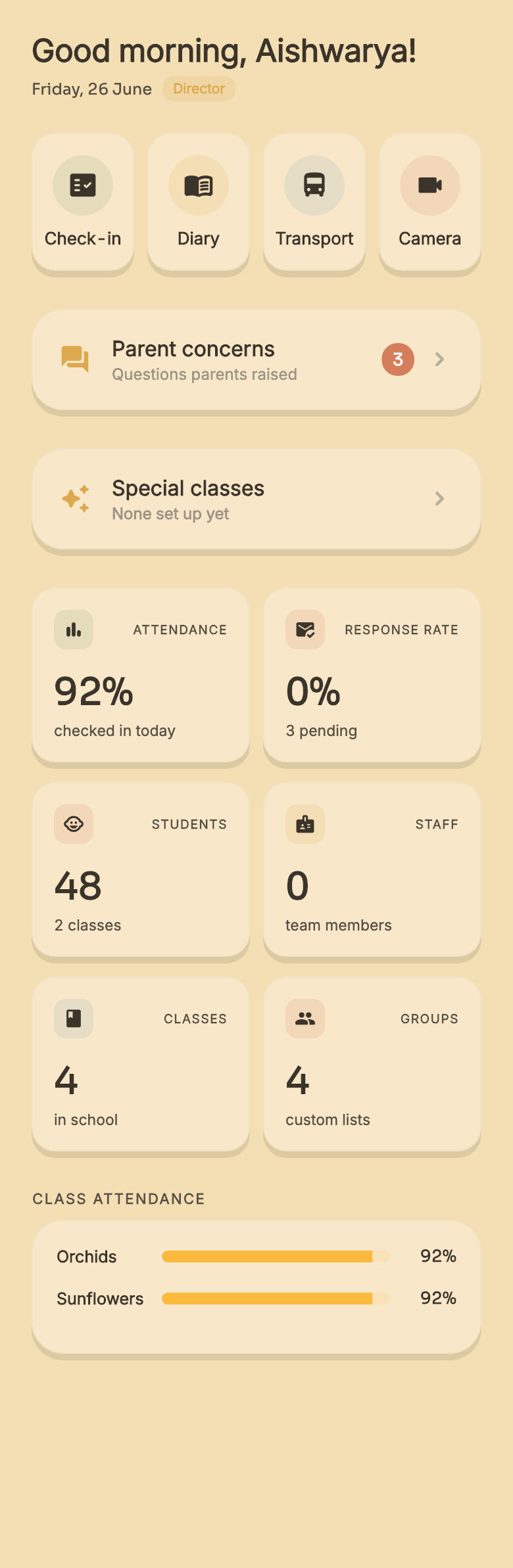
  1. The whole school, on one screen.

    Attendance, response rate, concerns, every class and every route. The people who run the school see all of it, and what needs a decision floats to the top.

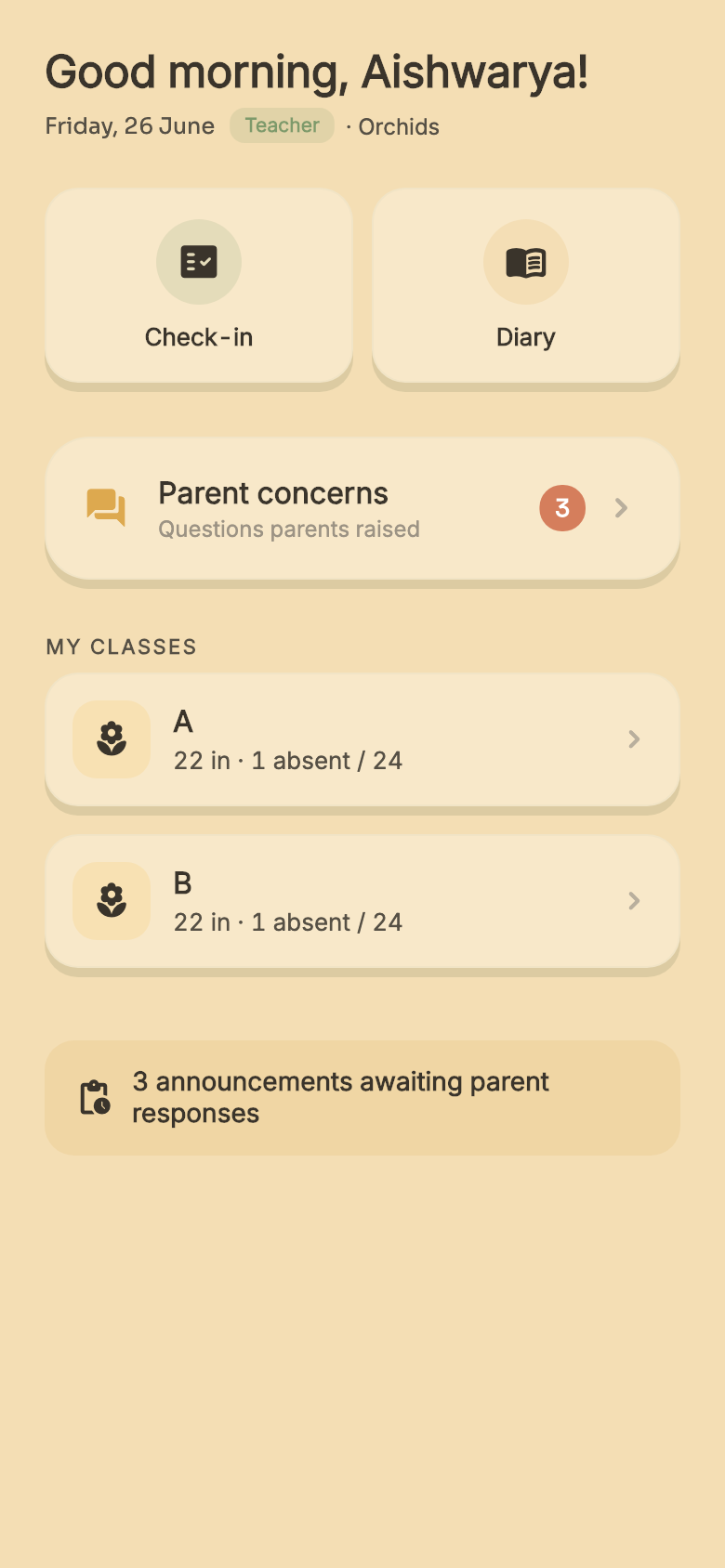
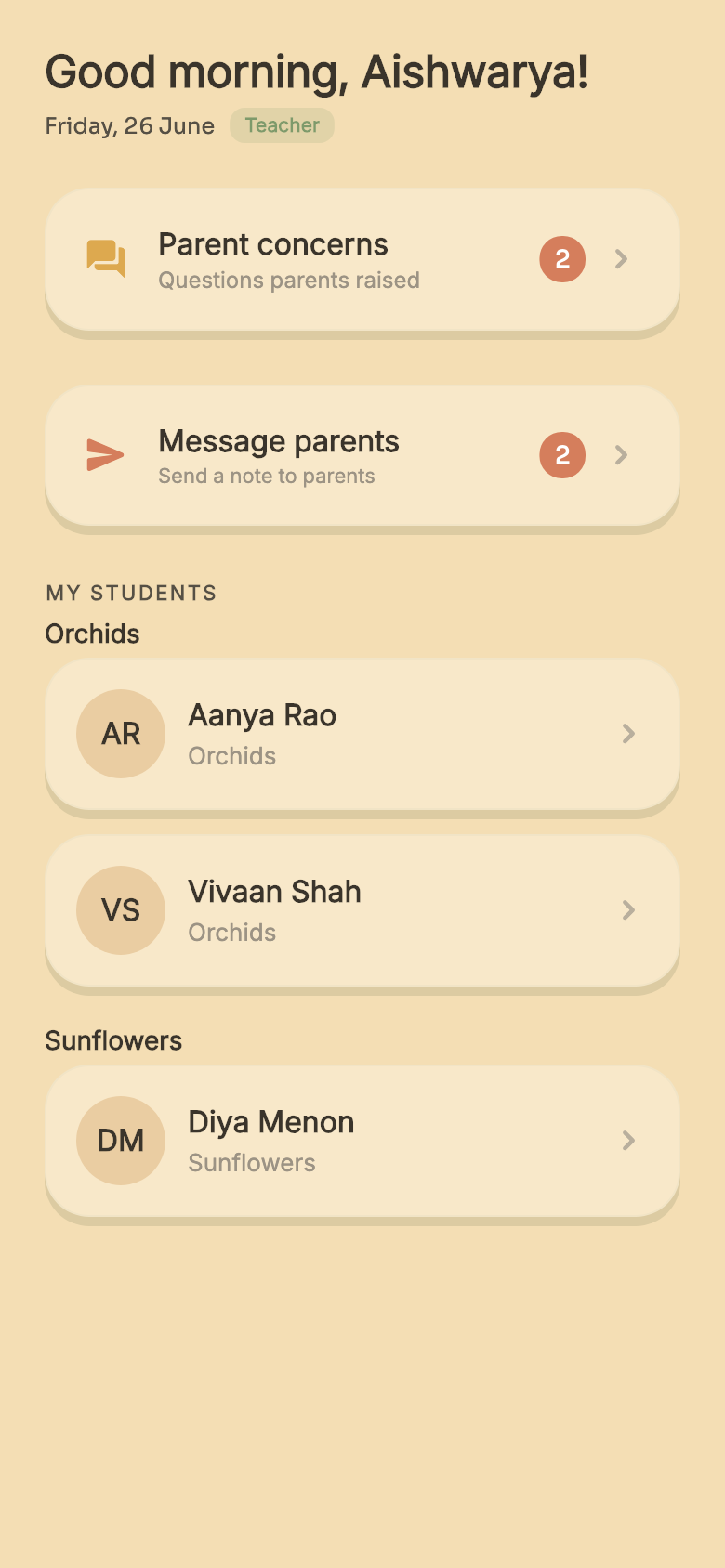
  2. Just my class. Nothing else.

    Her own children, who is in, who is absent, the concerns from those parents. The rest of the school is not her job, so it is not on her screen.

  3. Only my group.

    The visiting art or dance teacher sees just the children in the group, drawn from across the classes. They answer their own parents, and see nothing else.

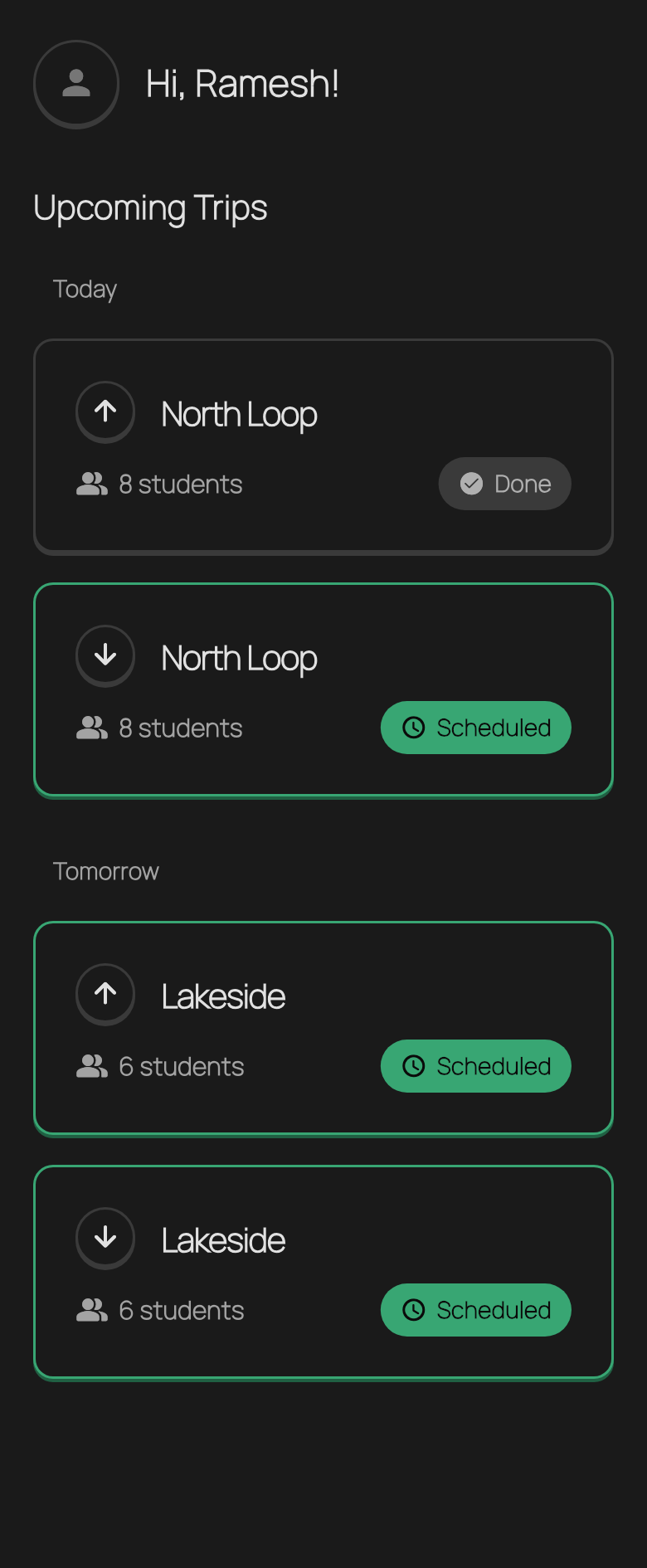
  4. The day’s runs, at a glance.

    The driver and the helper on the van open to the same thing: today’s runs. Morning pickups, afternoon drop-offs, one child at a time. Nothing else from the school.

A real school, every day

At Kriya Global Montessori, every parent is on the app. 75 of 75.

Running live at Kriya Global Montessori kriyamontessori.com ↗

Counted in June 2026. A few more schools are onboarding as we speak.

My two children go to a Montessori school. For a long time I could not tell what they were learning there. The progress was real. It was only invisible.
Amal Chandran, cofounderA Montessori parent first. Before Montigo, an engineer at CRED and Ola.

Questions schools ask

Before you book the demo.

Do teachers use a phone in the classroom?

No. The classroom floor stays free of screens. A teacher observes with her own eyes, then records after the work cycle, away from the children. One line is enough. Montigo fills in the rest for her to check.

What do parents actually see?

The material their child worked with, how much help the child needed, and what that work teaches, in plain words. No marks and no ranks. Nothing a parent can compare at the school gate.

What if a material on our shelf is not in Montigo?

Montigo covers most Montessori materials for ages 0 to 6, more than 200 of them. If yours has something else, a teacher adds it, and it works like every other material from then on.

Does it track the school van?

Yes. You plan the route with each child's stop, follow the van live on a map, and replay any past trip to see where it slowed down. A live camera in the van is available too.

How long does it take to start?

We set it up with you: your classes, your children, your routes. Parents join with one invite code. There is no hardware to buy for observations or van tracking.

The small first step

See it on your own school.

Bring one classroom and one teacher's notebook. We show you what your parents would see.

20 minutes on WhatsApp · with the founder · no follow-up spam

Prefer email? hello@montigo.school. We reply within a day.

What it takes to start
  • We set it up with youThe founder sits with you and sets up your classes, children and routes. You do not do it alone.
  • Parents join with one codeEach family gets an invite code. Install the app, enter the code, done.
  • No screens on the floorTeachers record after the work cycle, on the phone they already own.
Scroll to watch one child's month